
Selectable Table
This component displays tabular data with row selection capabilities. Users can navigate through rows using keyboard controls and select a specific row. The component supports pagination for large datasets and returns the index of the selected row.
| Property | Value |
|---|---|
| Interactivity | Required (fails in non-interactive terminals) |
Demo
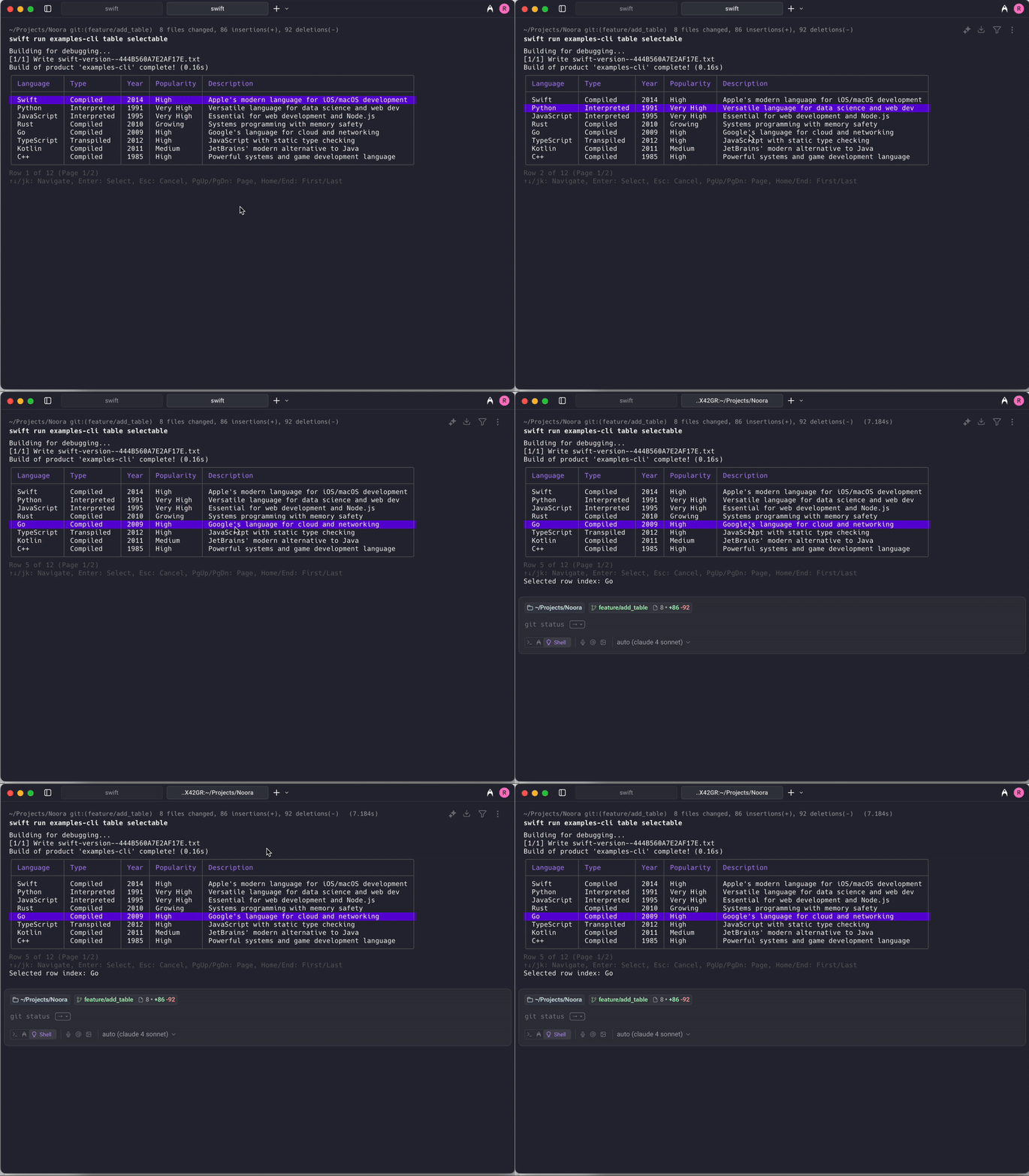
API
Basic Example
swift
// Simple seelctable table with string arrays
let noora = Noora()
let selectedIndex = try await noora.selectableTable(
    headers: ["Name", "Version", "Status"],
    rows: [
        ["React", "18.2.0", "Active"],
        ["Vue", "3.3.4", "Active"],
        ["Angular", "16.1.0", "Deprecated"],
        ["Svelte", "4.0.5", "Active"],
        ["Ember", "5.1.0", "Maintenance"]
    ],
    pageSize: 3
)
print("Selected row index: \(selectedIndex)")
Advanced Example with TableData
swift
// Advanced selectable table with custom styling and column configuration
let columns = [
    TableColumn(title: "Package", width: .flexible(min: 10, max: 20), alignment: .left),
    TableColumn(title: "Version", width: .fixed(10), alignment: .center),
    TableColumn(title: "Status", width: .auto, alignment: .right)
]

let rows: [[TerminalText]] = [
    [
        TerminalText("React"),
        TerminalText("\(.primary("18.2.0"))"),
        TerminalText("\(.success("Active"))")
    ],
    [
        TerminalText("Vue"),
        TerminalText("\(.primary("3.3.4"))"),
        TerminalText("\(.success("Active"))")
    ],
    [
        TerminalText("Angular"),
        TerminalText("\(.muted("16.1.0"))"),
        TerminalText("\(.warning("Deprecated"))")
    ],
    [
        TerminalText("Svelte"),
        TerminalText("\(.primary("4.0.5"))"),
        TerminalText("\(.success("Active"))")
    ]
]

let tableData = TableData(columns: columns, rows: rows)
let selectedIndex = try await noora.selectableTable(tableData, pageSize: 2)

// Use the selected index to get the corresponding data
let selectedRow = rows[selectedIndex]
print("Selected package: \(selectedRow[0].plain())")
Semantic Styling Example
swift
// Selectable table with semantic styling for better visual hierarchy
let headers: [TableCellStyle] = [
    .primary("Package"),
    .secondary("Version"),
    .accent("Status")
]

let rows: [StyledTableRow] = [
    [.plain("React"), .success("18.2.0"), .success("Active")],
    [.plain("Vue"), .success("3.3.4"), .success("Active")],
    [.plain("Angular"), .muted("16.1.0"), .warning("Deprecated")],
    [.plain("Svelte"), .success("4.0.5"), .success("Active")],
    [.plain("Ember"), .secondary("5.1.0"), .warning("Maintenance")]
]

let selectedIndex = try await noora.selectableTable(
    headers: headers,
    rows: rows,
    pageSize: 3
)
Error Handling
swift
do {
    let selectedIndex = try await noora.selectableTable(
        headers: ["Name", "Value"],
        rows: [["Item 1", "Value 1"], ["Item 2", "Value 2"]],
        pageSize: 5
    )
    print("User selected row: \(selectedIndex)")
} catch {
    print("Selectable table failed: \(error)")
    // This might happen in non-interactive terminals
}
Options
Basic selectable table method
| Attribute | Description | Required | Default value |
|---|---|---|---|
headers | Array of column header strings | Yes | |
rows | Array of row data (each row is an array of strings) | Yes | |
pageSize | Number of rows visible at once | Yes | |
renderer | A rendering interface that holds the UI state | No | Renderer() |
Advanced selectable table method with TableData
| Attribute | Description | Required | Default value |
|---|---|---|---|
data | TableData object with custom columns and content | Yes | |
pageSize | Number of rows visible at once | Yes | |
renderer | A rendering interface that holds the UI state | No | Renderer() |
Semantic styling method
| Attribute | Description | Required | Default value |
|---|---|---|---|
headers | Array of column headers with semantic styling | Yes | |
rows | Array of row data with semantic styling | Yes | |
pageSize | Number of rows visible at once | Yes | |
renderer | A rendering interface that holds the UI state | No | Renderer() |
Navigation Controls
The selectable table supports the following keyboard controls:
| Key | Action |
|---|---|
↑ / k | Move selection up |
↓ / j | Move selection down |
Enter / Space | Select current row |
Page Up | Move to previous page |
Page Down | Move to next page |
Home | Go to first page |
End | Go to last page |
Esc / q | Cancel selection (throws error) |
Return Value
The selectable table returns an Int representing the zero-based index of the selected row in the original data array. This allows you to:
- Access the selected row data:
rows[selectedIndex] - Perform actions based on the user's selection
- Map the index to your domain objects
Error Conditions
The selectable table will throw an error in the following situations:
- Non-interactive terminal: When running in a terminal that doesn't support interactive input
- User cancellation: When the user presses
Escorqto cancel the selection - Empty data: When no rows are provided